The Ultimate macOS AI Dictation & Transcription App — Features, Pricing & How It Works
If you type for a living — whether you're a software developer, professional writer, healthcare clinician, busy executive, or digital creator — you already know the bottleneck. Your thoughts arrive faster than your fingers can keep up. And the existing solutions? macOS built-in dictation is too basic. Dragon NaturallySpeaking is expensive and outdated. The newer AI dictation tools lock you into monthly subscriptions with credits you never fully use.
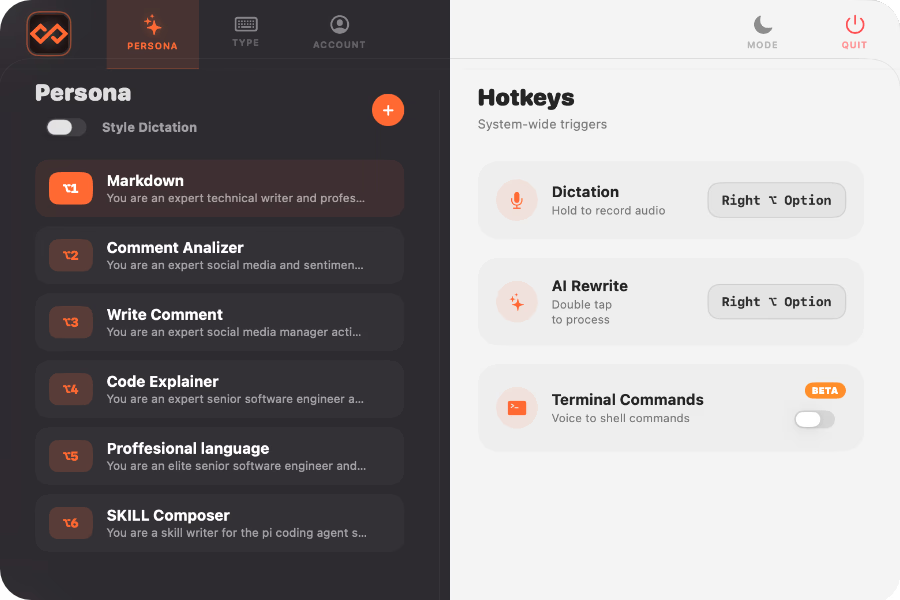
Velo is different. It's a premium macOS application purpose-built for people who need to move at the speed of speech. Hold a key, speak naturally, and your words appear at the cursor in any application on your Mac. Select any text, double-tap, and AI rewrites it instantly. Dictate in one language and output in another.
Let's break down what Velo actually does, who it's for, and why it might be the last dictation tool you ever install.
What Is Velo?
A Complete macOS Dictation Solution Velo is a native macOS app that does three core things exceptionally well:
Speech-to-Text Dictation — Hold a hotkey, speak naturally, release, and your words appear at the cursor — in any Mac application
AI-Powered Text Rewriting — Select any text on your screen, double-tap a key, and an AI rewrites it to your specifications — grammar fixes, tone changes, summaries, translations, or custom prompts
Real-Time Language Translation — Dictate in one language and get text in another, or translate selected text across 100+ languages
What makes Velo special is its system-wide functionality. Unlike other dictation apps that only work within their own interface, Velo works across your entire operating system. You can dictate directly into your web browser, your code editor, your terminal, your email client — without switching windows or copy-pasting.
Why Velo Is the Best Dictation App for Mac
Velo uses a smart hybrid approach to transcription technology. When you dictate, it chooses the best engine for the job:
Local Model uses WhisperKit on Apple's Neural Engine — fully offline, fast, and completely private. Your audio recordings never leave your Mac.
Cloud Model uses OpenAI Whisper or Groq Whisper for higher accuracy on challenging audio or noisy environments.
AI Personas: Customizable Rewriting Profiles
This is Velo's standout feature. Select any text in any application — a paragraph in Safari, a function in VS Code, an email in Apple Mail — and double-tap your hotkey. Velo sends that text through an AI language model for instant rewriting.
You can use it for:
- To make SKILL's and .MD files from docs
- Change the tone from casual to professional
- Summarize a long passage into key points
- Translate text into another language
- Apply a custom prompt you've written yourself — like "Make this sound like a thoughtful LinkedIn comment" or "Turn this into a concise bug report"
- Write social media comments only selecting the athor's post.
- ...and many many more!!
No copy-pasting. No window switching. Select, double-tap, done.
Translation Across 100+ Languages
Dictate in your native language and have Velo transcribe directly into a different language. Or select any text on screen and translate it instantly. Intelligent auto-detection means you don't need to specify source languages — Velo figures it out automatically.
Terminal Voice Commands
Still in BETA! When your frontmost app is a terminal, Velo automatically switches to command mode. Speak shell commands aloud and they execute directly. A whitelist-based security model prevents dangerous commands from running, so you're never one accidental phrase away from rm -rf /.
How Velo Protects Your Data
- Velo was designed with privacy as a first-class concern:
- Local dictation works completely offline — your audio never leaves your Mac
- Velo never stores or reads your dictations or text content
- Your API keys live exclusively in your local macOS Keychain
- GDPR compliant
Getting Started with Velo Dictation Software
Download Velo from velotype.app — it's free
Install it like any Mac app. On first launch, macOS will ask for Microphone, Accessibility, and Input Monitoring permissions — this is standard for any app that needs system-wide access
Connect your API keys, or use local WhisperKit for offline dictation
Hold Option and speak — release to transcribe
Total setup time is about 60 seconds from download to first dictation.
Start Typing at the Speed of Speech
Velo is built on a simple truth: your thoughts arrive faster than your fingers. Whether you're dictating an email, rewriting a paragraph, translating a document, or describing code you want written — Velo keeps you in your flow.
No subscriptions for AI tokens. No vendor lock-in. Just a fast, private dictation layer for your Mac that works the way you speeak.